Skip to content
  • Live
  • Blog
  • Shop
  • Contact
  • About
  • Discord
  • GitHub
  • YouTube
  • Twitch
  • Instagram
CheerLights

CheerLights

We are all connected.

CheerLights on GitHub, Twitch, and Discord. We are all connected.
  • Learn
  • Build
  • Connect
  • Toggle search form

CheerLights Trees are Back at MathWorks

Posted on December 7, 2016October 28, 2026 By Hans Scharler No Comments on CheerLights Trees are Back at MathWorks

The CheerLights color is now set on Discord. This post is from when anyone could tweet a color to CheerLights. Today, use the /cheerlights command on the CheerLights Discord, and see the Learn page for the current API.

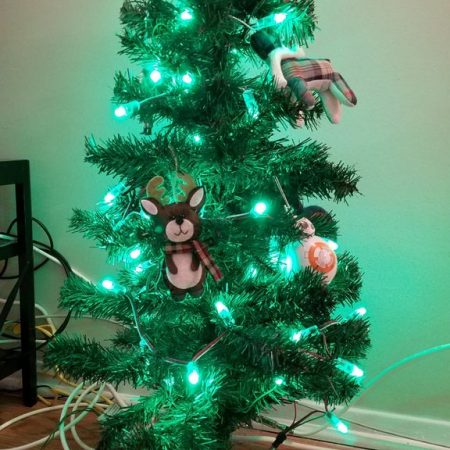
Outside of the headquarters of MathWorks, Robert Mawrey outfitted two trees with NeoPixel lights from Adafruit and connected them to the CheerLights project using the Particle Photon.   Robert added a new feature to capture multiple colors in one tweet by taking advantage of functions supported by the Particle cloud.

.@scharler this is what red, white, and blue @cheerlights looks like @MathWorks pic.twitter.com/JRry6DHTqS

— ThingSpeak (@thingspeak) December 7, 2016
They are beautiful!

Share this:

  • Share on X (Opens in new window) X
  • Share on Facebook (Opens in new window) Facebook
  • Share on Tumblr (Opens in new window) Tumblr
  • Share on Reddit (Opens in new window) Reddit
  • More
  • Share on Pinterest (Opens in new window) Pinterest
  • Share on LinkedIn (Opens in new window) LinkedIn
  • Email a link to a friend (Opens in new window) Email
  • Print (Opens in new window) Print

Related


Discover more from CheerLights

Subscribe to get the latest posts sent to your email.

Projects Tags:adafruit, neopixels, Particle, Twitter

Post navigation

Previous Post: Christmas Tree Connected to CheerLights with the Adafruit HUZZAH ESP8266
Next Post: CheerLights Potted Tree Connected With an ESP8266 LED Wi-Fi Controller

Related Posts

Great Comment on Twitter! News
Christmas Tree Connected to CheerLights with the Adafruit HUZZAH ESP8266 Projects
An LED sign reading BUILT BY YOU in CheerLights colors Code for the BlinkStick and CheerLights @bassdread @adafruit #iot Projects

Leave a Reply Cancel reply

Your email address will not be published. Required fields are marked *

This site uses Akismet to reduce spam. Learn how your comment data is processed.

Get new CheerLights posts by email

Tutorials, new builds, and announcements, one email per post.

  • CheerLights for Home Assistant: Your Lights Follow the Color Everyone Shares
  • CheerLights Terminal 0.2: Watch the Color Change Live in Your Terminal
  • CheerLights on an omg.lol Profile Card: A Display With No Hardware
  • CheerLights on Bluesky: Post a Color and Lights Around the World Change
  • Pimoroni CheerLights Examples: Six Boards, From Presto to Mighty FX

Copyright © 2026 CheerLights.

Powered by PressBook Grid Blogs theme

Loading Comments...